education
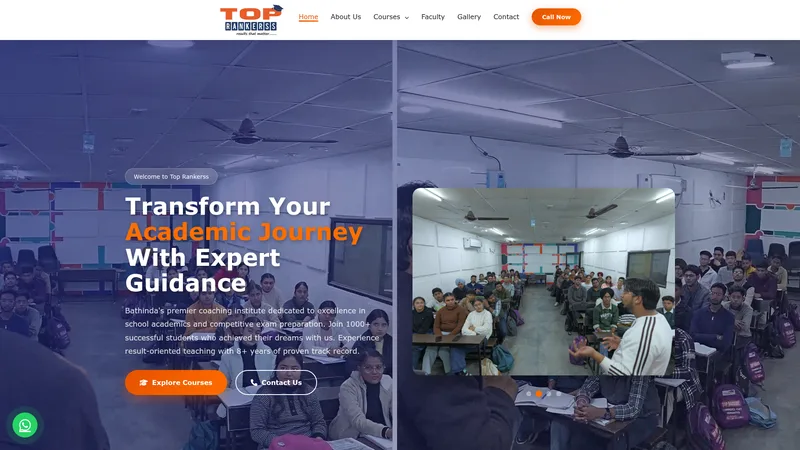
Top Rankerss — Coaching Institute Bathinda
Published coaching project example for reviewing education-site presentation.
View this portfolio example
Sirsa businesses in trade, coaching and healthcare need distinct website journeys. Explain each offer, answer practical questions and guide visitors to a buyer enquiry, admission discussion or appointment. Search positions depend on Google; publish useful information and measure the work rather than promising a rank.
Review real portfolio pages for visual and project context. These examples are selected by project type and are not claims that each client is based in Sirsa.
Published coaching project example for reviewing education-site presentation.
View this portfolio example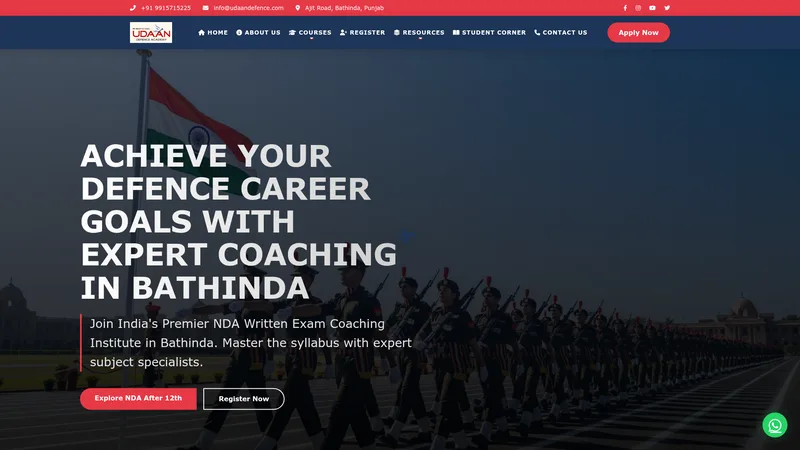
Published course-focused website example; the portfolio page provides its project context.
View this portfolio exampleA trade page should make product details and buyer enquiries easy to find. A coaching site needs current course, batch and admission information; healthcare pages should present verified services and contact details, not unsubstantiated treatment outcomes.
BuntyTech works remotely with businesses in Sirsa. Before development begins, we confirm the project scope, communication plan, approval steps and any travel requirements.
For a Sirsa project, a landing page starts from ₹1,500. Other quotes depend on page count, admin features, payments, bookings and integrations; review the full package prices and inclusions before choosing.
View website pricesFor cotton businesses in Sirsa, organise products or services with accurate specifications, variants, availability and a clear enquiry or order path. Keep changing prices and stock current, or explain how customers can confirm them.
For coaching providers in Sirsa, show current programmes, eligibility, schedules and admission or booking steps. Assign an owner for dates and fees, and avoid guarantees about exam results, placements or admissions.
For healthcare in Sirsa, publish verified service, practitioner and contact details. Make appointment steps clear, avoid unsupported treatment or outcome claims, and do not collect sensitive information through a basic form.
Before development, decide whether the main conversion is a buyer quote request, a coaching enquiry or an appointment request. Keep that action prominent, and make the supporting information specific to the selected audience.
A Sirsa website should give each audience a direct route: cotton buyers find product details and trade enquiries, students find courses and admission steps, and healthcare visitors find verified services and appointment information. Use clear navigation and keep each page focused on one audience. Put its next step near the information that supports the decision. BuntyTech works remotely with businesses serving Sirsa; Google determines search positions.
Trade pages should show only products, grades, supply conditions and specifications that the business confirms. Coaching pages need a process for updating courses, schedules, fees and admission requirements; avoid guarantees about exam results or placements. Healthcare pages should describe verified services and credentials, protect sensitive information and avoid unsupported treatment claims. Each page can use a short question list to guide the enquiry, but should not ask for data that staff do not need. Provide a person responsible for changes and a review date for details that often move. If availability or pricing changes regularly, explain how customers can confirm current information rather than relying on an old page.
Choose one main action for each page: request a buyer quote, ask about a batch or contact a clinic. Keep that action clear and make phone links tappable on mobile. If a form is used, test validation, confirmation, email or admin delivery and spam protection before launch; a visual form that drops messages is not a working enquiry channel. Explain the next step after submission without inventing a service-level promise. Review common questions from real enquiries and improve the relevant page when visitors repeatedly need clarification. Search visibility depends on many factors outside a page's wording, so combine accurate content with a technically accessible site and review verified Search Console data rather than assuming an index request has succeeded.
Use these checks to decide what to build, what to prepare and how to test the parts customers will rely on.
A cotton or agricultural trade page should make the product range, grades, specifications, supply area and quotation process easy to find. If the offer depends on crop season or current stock, explain how buyers confirm availability rather than leaving a stale rate in a headline. Use an RFQ route when a salesperson needs quantity or grade details to prepare a response. A catalogue should help a buyer assess fit; it should not imply that every item is always ready to ship.
An education visitor may need to know which programme is offered, who is eligible, how the schedule works, what information to prepare and how to ask about admission. Keep the details in a predictable order and assign someone to review dates and fees. Avoid claims that guarantee exam marks, admission or placement. A concise course enquiry form can capture the programme and preferred contact method without asking for unnecessary personal details.
For a healthcare provider, publish reviewed service descriptions, practitioner details, current hours and appointment steps. A basic website form should not collect symptoms, medical history or reports. Tell visitors how to contact the clinic and what the form is for. Use approved photographs and do not suggest an outcome that the provider has not substantiated. Separate healthcare content from trade and education sections so each audience can quickly understand the relevant information.
A public catalogue, a negotiated quotation and a full online store are different operating models. A catalogue suits browsing; a quotation path suits changing specifications and volume; checkout suits products with maintained prices, stock, delivery and returns. Decide who responds to requests, confirms availability and handles after-sale questions. If those tasks are not assigned, begin with a clear enquiry flow and expand functionality only when the business is ready to support it.
Test each customer journey on a phone: find a product, open course information, locate appointment details and submit the relevant form. Confirm that messages arrive in a monitored inbox and that confirmation text explains the next step without making an unverified response-time promise. Review the questions staff receive after launch and improve the matching section. Keep the service area accurate and avoid adding separate pages for nearby towns unless each page has useful facts that genuinely differ.
These details help BuntyTech review your requirements and agree scope, price and milestones in writing.
Compare the Bhuna plan with the requirements outlined for Sirsa; choose pages and functions for the audience each site must serve.
Compare the Fatehabad plan with the requirements outlined for Sirsa; choose pages and functions for the audience each site must serve.
Compare the Hisar plan with the requirements outlined for Sirsa; choose pages and functions for the audience each site must serve.
Compare the Gurugram (Gurgaon) plan with the requirements outlined for Sirsa; choose pages and functions for the audience each site must serve.
Use the location directory to compare remote service areas before choosing the right enquiry route for a Sirsa project.
For a Sirsa website focused on cotton businesses and coaching providers, tell us the visitor action and features you need. We can review the scope before quoting.
Contact BuntyTechFor a project serving Sirsa, tell us the intended audience, the main action visitors should take and any essential functions.